Alpha Oscillator
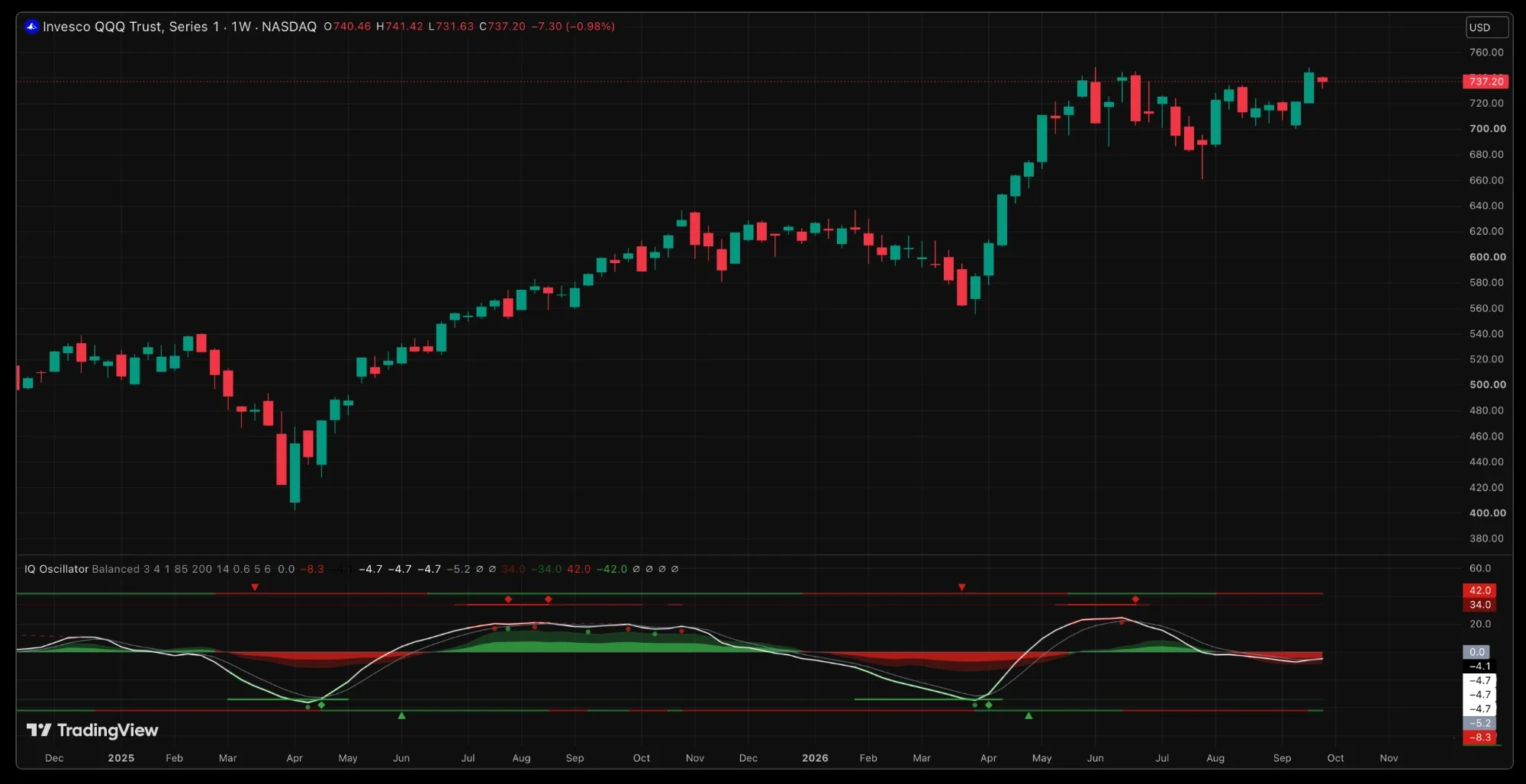
Alpha Oscillator is the momentum layer of the suite, in its own pane under price. A smoothed wave centred on zero says which side momentum is on and whether it is building or fading; money flow runs behind it; the extremes are measured against the symbol's own history; and a silent copy of the Bands' trend engine marks the bars where trend and momentum agree.
Key features
The wave and the signal
The wave is the rate of change between a fast and a slow average of price, normalised to sit between minus fifty and fifty and then smoothed. Zero is the regime line: a close that carries the wave across it is the momentum flip. The grey signal line is a slower copy of the wave; the wave above its signal is momentum leading, below it rolling under.
The wave speed preset picks the internal lengths. Sharp and Fast react sooner and flip more; Balanced is the default; Slow is the position trader's read.
Marks in the pane
Extremes and reversals
Rather than a fixed overbought line, the script ranks the wave against its own last two hundred bars and calls the top fifteen percent stretched high, the bottom fifteen stretched low. The strictness and the lookback are yours to set. Inside a zone the wave's halo heats, red at the top and green at the bottom, and the strip lights fully. A turn inside the zone is the reversal diamond; the alert fires on the way into a zone, once, not on every bar inside it.
Confluence
A copy of the Bands' regime engine runs inside the oscillator and is never drawn. It is there for one thing: to mark the bars where trend and momentum agree. The panel's Confluence row counts four conditions, the wave's side, the wave against its signal, the flow's side and the trend regime, and shows how many side with the bulls, from 0 of 4 to 4 of 4.
Settings
Defaults are tuned for daily trading on equities. Inputs are named by effect.
| Setting | Default | What it changes |
|---|---|---|
| Wave speed | Balanced | The internal length set: Sharp, Fast, Balanced or Slow. Faster reacts sooner and flips more. |
| Smoothing | 3 | Smoothing applied to the wave. 1 turns it off. |
| Signal smoothing | 4 | How slow the signal line is relative to the wave. |
| Turn confirmation bars | 1 | Bars the wave must hold a new direction before a turn prints. |
| Extreme strictness / lookback | 85 / 200 | The percentile that counts as stretched, and the window it is measured over. |
| Flow smoothing / height | 14 / 0.6 | The money-flow lookback and how tall the ribbon draws. |
| Divergence sensitivity | 5 | The swing size the divergences are measured on. History shown keeps the last six lines. |
| Toggles | Signal, turns, strips, diamonds, flow, divergences, confluence, panel on; hidden divergences and candle paint off | Visuals only. Every engine and alert runs either way. |
How to use it
Watch which side of zero the wave is on and whether it is above or below its signal. A zero cross is the momentum flip; a diamond on a strip is a reversal from an extreme; a triangle at the pane's edge is the flip the trend agrees with. Divergences warn that a new price extreme came on less momentum. The panel sums it up: the verdict, momentum rising or falling, whether the wave is stretched, which way flow leans, and the confluence count.
Alerts
Create one alert on Alpha Oscillator and pick "Any alert() function call". Every event arrives named: flipped bullish or bearish, reversal from the lower or upper extreme, bullish and bearish divergence, hidden divergences, CONFLUENCE LONG and SHORT, and entry into the upper or lower extreme zone. The full walkthrough is in the Alerts guide.